Integrating the Boho Dreamcatcher Laser Cut Bundle into Your Creative Workflow
In the evolving landscape of digital fabrication, efficiency is not merely about speed; it is about the seamless transition from concept to physical object. For makers, small business owners, and creative entrepreneurs, the bottleneck often lies not in the cutting process itself, but in the preparation phase. This is where a well-structured asset like the Boho Dreamcatcher Laser Cut Bundle becomes a critical component of a productive workflow. Rather than spending hours drafting intricate vector paths from scratch, creators can leverage pre-optimized designs to accelerate production while maintaining high aesthetic standards.
This bundle represents more than just a collection of images; it is a functional tool designed to integrate smoothly into existing laser cutting pipelines. Whether you are preparing for a seasonal rush at a Christmas market or curating a unique line of home décor, understanding how to effectively implement these digital assets can significantly enhance your operational consistency and output quality.
Understanding the Asset Structure and Compatibility
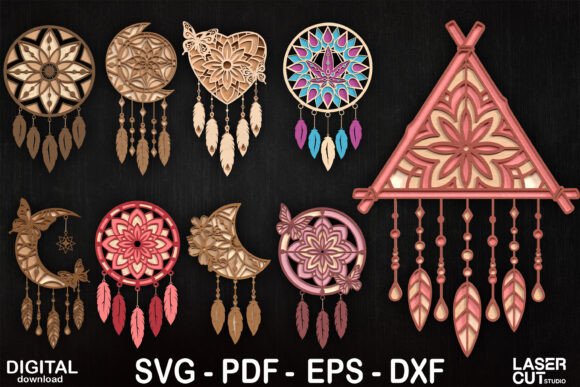
The foundation of any successful laser cutting project is file compatibility. The Boho Dreamcatcher Laser Cut Bundle is delivered in four primary formats: SVG, PDF, EPS, and DXF. Each format serves a specific purpose within the digital fabrication ecosystem, and knowing which to use can streamline your setup time.
- SVG (Scalable Vector Graphics): This is the most versatile format for modern laser software such as LightBurn, LaserGRBL, and many browser-based platforms. It preserves layer information and scale without pixelation, making it ideal for quick imports and adjustments.
- DXF (Drawing Exchange Format): Preferred by users of industrial-grade software like AutoCAD or CorelDRAW, DXF files ensure precise geometric data transfer. If your workflow relies on CAD environments for nesting parts to maximize material usage, this is your go-to format.
- EPS (Encapsulated PostScript): A standard for graphic design professionals using Adobe Illustrator or Inkscape. EPS files are excellent if you plan to modify the design elements, combine them with other graphics, or adjust line weights before sending them to the cutter.
- PDF (Portable Document Format): While less common for direct machine control, PDFs are invaluable for proofing, client approvals, or hybrid workflows where design verification is needed before committing to machine time.
By providing this multi-format suite, the bundle ensures that regardless of your preferred software stack—whether you are a hobbyist using free tools or a professional utilizing enterprise-level applications—you can integrate the files without conversion errors or loss of fidelity. This compatibility reduces the friction typically associated with sourcing third-party assets, allowing you to focus on execution rather than troubleshooting file imports.
Strategic Implementation in Production Workflows
Integrating the Boho Dreamcatcher Laser Cut Bundle into your routine requires a shift from ad-hoc creation to systematic production. Here is how these assets fit into the broader lifecycle of a product launch or custom order.
Pre-Production Planning and Material Selection
Before powering up the laser, effective planning dictates selecting the right substrate. The boho aesthetic of dreamcatchers lends itself beautifully to natural materials. Wood, particularly plywood or basswood, offers a warm, organic finish that complements the intricate lace-like patterns of the cut. Alternatively, acrylic provides a modern, sleek look, especially when using contrasting colors for the hoop and the webbing.
When planning your cut, consider the kerf—the width of the material removed by the laser. High-quality SVG and DXF files account for standard kerf widths, but always perform a test cut on your specific material. This step is crucial for ensuring that interlocking parts, if any, fit together snugly without requiring excessive force or adhesive. Organizing your workspace during this phase involves grouping similar materials and calibrating your laser’s focus and power settings accordingly.
Execution and Machine Optimization
Once the files are uploaded to your laser cutting software, the next phase is parameter optimization. The complexity of a dreamcatcher design means there are numerous small details and tight curves. To prevent charring or incomplete cuts, adjust your speed and power settings based on the material thickness. For wood, a slower speed with moderate power often yields cleaner edges, while acrylic may require higher speeds to achieve a polished, flame-polished edge.
Use the layering capabilities of your software to separate cut lines from engrave lines if the design includes textured details. This allows you to run the engraving pass first, followed by the cutting pass, ensuring that the material remains stable during the detailed work. This methodical approach minimizes errors and reduces material waste, a key consideration for maintaining profitability in small-batch production.
Post-Processing and Value Addition
The laser cutter completes only half the job. The true value of the Boho Dreamcatcher Laser Cut Bundle is realized in the assembly and finishing stages. This is where manual craftsmanship intersects with digital precision. After cutting, remove the pieces carefully to avoid breaking delicate connectors. Sanding may be required for wooden pieces to remove minor char marks or splinters, enhancing the tactile quality of the final product.
Assembly is an opportunity for customization. Traditional dreamcatchers feature feathers, beads, and woven threads. By combining the laser-cut structural elements with hand-tied textiles, you create a hybrid product that appeals to customers seeking both modern manufacturing precision and artisanal charm. This differentiation is vital for standing out in crowded markets such as Etsy or local craft fairs.
For those targeting commercial sales, consistency in assembly is key. Develop a standard operating procedure (SOP) for tying knots and arranging feathers. This ensures that every unit produced meets the same quality standards, reinforcing your brand’s reputation for reliability. The digital files provide the consistent base; your manual finishing provides the unique touch.
Commercial Applications and Market Positioning
The versatility of the Boho Dreamcatcher Laser Cut Bundle makes it suitable for various commercial avenues. Understanding where these products fit in the market can help you position them effectively.
- Holiday Gifts and Seasonal Decor: During the fourth quarter, demand for unique, handcrafted gifts spikes. Dreamcatchers serve as thoughtful presents for friends and family, appealing to those who appreciate bohemian or spiritual aesthetics. Marketing these as "ready-to-assemble kits" can also engage customers who enjoy DIY projects, expanding your target audience.
- Craft Fairs and Christmas Markets: Visual appeal drives impulse buys at physical events. Displaying assembled dreamcatchers alongside the raw laser-cut components can demonstrate the transformation process, adding perceived value. The intricate nature of the laser cuts acts as a conversation starter, drawing potential customers to your booth.
- Home and Office Décor: Beyond personal gifts, these items function as statement pieces for interior design. Real estate stagers, office managers, and boutique hotel owners often seek unique décor items that add warmth and character. Offering bulk discounts for larger orders can open B2B revenue streams.
Long-Term Utility and Asset Management
Unlike physical inventory, digital assets do not degrade. The Boho Dreamcatcher Laser Cut Bundle is a one-time purchase that offers indefinite utility. However, to maximize its long-term value, proper file management is essential. Store the original SVG, PDF, EPS, and DXF files in a cloud-backed folder structure, categorized by design type and date. This organization ensures that you can quickly retrieve files for reorders or modifications without searching through cluttered directories.
Furthermore, keep a log of the laser settings used for different materials. Over time, this database becomes a valuable resource, reducing setup time for future projects. If you modify the design—for instance, resizing it for a larger wall hanging—save the new version as a distinct file to preserve the original integrity. This disciplined approach to digital asset management supports scalability, allowing you to expand your product line efficiently as your business grows.
In conclusion, the Boho Dreamcatcher Laser Cut Bundle is more than a decorative template; it is a strategic resource for creators aiming to optimize their production workflows. By leveraging its multi-format compatibility, integrating it into a structured planning process, and applying consistent post-processing techniques, you can transform digital files into tangible, high-value products. Whether for personal enjoyment or commercial enterprise, this bundle provides the foundational structure needed to execute creative visions with precision and efficiency.