Mastering the Art of 3D Layered Design: A Guide to the Ocean Octopus SVG
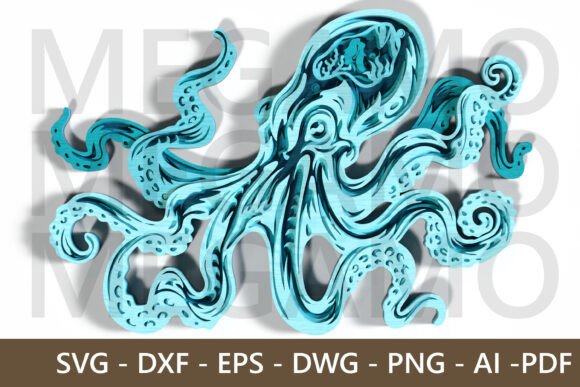
In the evolving world of digital fabrication and DIY crafts, few trends have captured the imagination quite like 3D layered paper art. This technique transforms flat materials into stunning, dimensional sculptures by stacking precisely cut layers. At the heart of this creative movement is the need for high-quality, professionally designed files that account for depth, shadow, and structural integrity. One standout example of this craft is the Layered Ocean Octopus 3D SVG File, a design that perfectly encapsulates the fluid beauty of marine life through intricate cutting patterns.
For beginners and experienced makers alike, understanding how these files work is the first step toward creating professional-grade wall art. This article explores the significance of layered designs, the technical requirements for successful fabrication, and why the octopus motif remains a timeless choice for home decor.
Understanding Layered 3D SVG Designs
At its core, a layered 3D SVG (Scalable Vector Graphics) file is not just a single image; it is a blueprint for construction. Unlike traditional 2D vector art, which is intended for printing or simple vinyl cutting, a 3D layered file is divided into multiple distinct parts. Each part represents a specific "slice" of the final object. When these slices are cut from material—typically cardstock, wood, or acrylic—and stacked in a specific order, they create an illusion of depth and volume.
The Layered Ocean Octopus design exemplifies this principle. It utilizes 8 separate layers to build the form of the creature. The bottom layers usually represent the background or the deepest shadows, while the top layers capture the highlights and finest details, such as the flowing tentacles and the texture of the skin. This method mimics the way light interacts with three-dimensional objects, providing a realistic and engaging visual experience without requiring complex sculpting skills.
The Significance of Precision in Digital Files
Why is the quality of the digital file so critical? In laser cutting or CNC machining, precision is paramount. A poorly designed file may have gaps between layers, misaligned anchor points, or lines that are too close together, causing the material to burn or break. The Octopus 3D design is engineered with intricate cuts that maintain structural integrity while allowing for the delicate, organic shapes of the tentacles. This balance between aesthetic beauty and mechanical feasibility is what separates amateur designs from professional-grade assets.
Practical Applications in Modern Creativity
The versatility of layered SVG files extends far beyond simple hobbyist projects. They have found a significant place in modern interior design, gift-giving, and even educational settings. Here is how this technology fits into various aspects of daily life and creativity:
- Home Decor: Large-scale layered art serves as a striking focal point in living rooms, nurseries, or offices. The ocean theme, in particular, brings a sense of calm and wonder to a space.
- Personalized Gifts: Because these files are scalable, creators can customize the size and color scheme to match the recipient’s taste, making for unique, handcrafted presents.
- Educational Tools: Teachers use layered designs to teach concepts of anatomy, geography, or marine biology, allowing students to physically assemble and understand complex structures.
- Small Business Opportunities: Crafters can sell finished pieces or digital files on marketplaces, leveraging the high demand for unique, handmade decor.
Technical Specifications and Compatibility
One of the most appealing aspects of the Layered Ocean Octopus 3D SVG File is its broad compatibility. Digital fabrication tools vary widely, from consumer-grade die-cutting machines to industrial laser cutters. To ensure accessibility, this design is provided in multiple formats, including SVG, DXF, EPS, DWG, PNG, AI, and PDF.
Each format serves a specific purpose:
- SVG and DXF: Ideal for most consumer cutting machines (like Cricut or Silhouette) and basic laser cutters. These formats preserve vector paths for clean cuts.
- EPS and AI: Preferred by professional graphic designers using Adobe Illustrator or CorelDRAW for further customization before cutting.
- DWG: Essential for users working with AutoCAD or other engineering-focused software, often used in architectural or industrial CNC applications.
- PNG and PDF: Useful for previewing the design, printing reference guides, or using with software that does not support vector editing.
This multi-format approach ensures that whether you are a hobbyist with a desktop cutter or a professional with a large-format CNC router, you can utilize the design effectively.
Scalability and Customization
A common misconception among beginners is that digital files are fixed in size. However, vector-based designs are infinitely scalable. The default size for this octopus design is 30x42cm, which is a standard medium size for wall art. Yet, users can resize the file freely to suit their project needs. Want a massive statement piece for a lobby? Scale it up. Need a small desk ornament? Scale it down. The vector paths adjust automatically, ensuring that the cut lines remain crisp regardless of the dimensions.
Note: When scaling down significantly, users should be mindful of the minimum cut width of their machine. Intricate details may need to be simplified if the material cannot support very fine cuts.
Step-by-Step Guide to Creating Your 3D Octopus
Creating a layered 3D piece is a rewarding process that combines digital precision with hands-on craftsmanship. Here is a general workflow to help you get started:
1. Prepare Your Materials: Choose your medium. Cardstock is popular for its ease of use and availability in various colors. Wood veneer offers a rustic, natural look, while acrylic provides a modern, glossy finish. For an octopus, shades of blue, teal, and purple work beautifully to mimic the ocean depths.
2. Import and Arrange: Open your chosen file format in your design software. Ensure that all 8 layers are present and correctly ordered. Assign different colors to each layer in the software to visualize the final stack.
3. Cut the Layers: Send the file to your laser cutter or CNC machine. If using a blade cutter, ensure the blade depth is adjusted for the material thickness. Cut each layer individually, keeping them organized.
4. Assembly: This is where the magic happens. Start with the bottom layer (the background) and apply adhesive foam squares or glue spacers between each subsequent layer. The spacers create the physical gap that allows shadows to form, enhancing the 3D effect. Work your way up to the final layer, which features the detailed tentacles.
5. Framing: Once assembled, place the artwork in a deep-shadow box frame. This protects the delicate layers and provides a finished, professional look suitable for hanging.
Common Misunderstandings About Layered Art
Many newcomers assume that 3D layered art is overly complex or requires expensive equipment. In reality, the availability of pre-designed files like the Layered Ocean Octopus has democratized this art form. The heavy lifting of design—calculating offsets, ensuring connectivity, and balancing aesthetics—is already done. The user’s role is primarily focused on execution and assembly.
Another assumption is that these designs are fragile. While paper art requires care, using durable materials like plywood or acrylic, combined with proper framing, results in robust pieces that can last for years. The key is selecting the right material for the intended environment.
Conclusion
The Layered Ocean Octopus 3D SVG File is more than just a digital download; it is an invitation to explore the intersection of technology and art. By capturing the fluid motion of an octopus with intricate cuts and flowing tentacles, it offers a perfect project for those looking to dive into the world of 3D papercraft or laser cutting. Whether you are creating sea-themed home decor, searching for a unique gift, or simply expanding your DIY skills, this design provides the flexibility and quality needed for success.
With its scalable nature, comprehensive file formats, and stunning visual impact, this layered design stands as a testament to the possibilities of modern digital fabrication. Embrace the creativity, respect the precision, and enjoy the process of bringing the ocean to life in your own home.