Sea View Wall Art Panel Laser Cut Files: Integrating Coastal Design into CNC Workflows
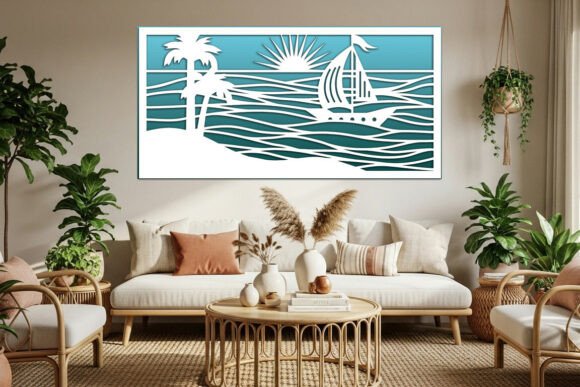
In the realm of digital fabrication and interior design, the intersection of aesthetic appeal and technical precision is where successful projects are born. For makers, designers, and small business owners, sourcing high-quality vector assets is not merely a preliminary step; it is a foundational element that dictates the efficiency and quality of the final output. Sea View Wall Art Panel Laser Cut Files represent a specialized category of digital assets designed to streamline this process. These files offer a cohesive visual narrative—featuring palm beaches, rolling sea waves, sailboats, and sun-drenched horizons—while providing the technical versatility required for modern CNC operations.
Integrating these designs into your workflow requires more than just downloading a file. It demands an understanding of how vector graphics interact with cutting machinery, material constraints, and end-use applications. Whether you are producing large-scale room screens, intricate home interior panels, or delicate paper art for greeting cards, the utility of these files lies in their adaptability. This article explores how to effectively incorporate sea-themed laser cut designs into your creative and commercial processes, ensuring consistent quality and operational efficiency.
Understanding the Asset Structure and Compatibility
The core value of any digital cutting file lies in its format compatibility and scalability. The pack associated with this sea view landscape design includes SVG, DXF, and EPS files. Each format serves a distinct purpose within the digital fabrication ecosystem.
- SVG (Scalable Vector Graphics): Ideal for web-based design tools and software like Cricut Design Space or Silhouette Studio. SVGs maintain crisp edges at any scale, making them perfect for rapid prototyping.
- DXF (Drawing Exchange Format): The industry standard for CAD software and professional CNC machines. If you are using AutoCAD, CorelDRAW, or industrial laser controllers, DXF ensures precise path interpretation without data loss.
- EPS (Encapsulated PostScript): Preferred by graphic designers using Adobe Illustrator or Inkscape. EPS files allow for easy manipulation of nodes and paths before sending the design to the cutter.
Because these are vector files, you can change the scale with no quality loss. This is critical for workflow flexibility. A design intended for a small decorative hanging can be scaled up to become a full-width room screen without pixelation or jagged edges. Additionally, the inclusion of high-resolution PNG and JPG files on transparent backgrounds expands the utility beyond physical cutting. These raster images can be used for digital mockups, client presentations, or as background layers for printing and engraving projects, allowing you to visualize the final product before committing materials.
Material Selection and Machine Optimization
The phrase "use various materials depending on your design ideas and your cutting machine specialities" is not just a suggestion; it is a directive for quality control. The sea view landscape, with its intricate details like yacht rigging and wave crests, reacts differently depending on the substrate.
For wood and plywood, these panels serve as excellent decorative wall art. When cutting wood, ensure your laser focus is precise to avoid charring the intricate wave patterns. Maple and birch plywood offer a clean, light finish that complements the coastal theme. For a more dramatic effect, consider staining the wood before assembly to highlight the depth of the cut layers.
Acrylic and MDF are suitable for modern interior partitions or room screens. Acrylic provides a sleek, contemporary look, especially if you opt for frosted or translucent sheets that mimic the appearance of sea mist. However, acrylic requires slower cutting speeds and adequate ventilation to prevent melting. MDF, while less expensive, produces significant dust and requires post-processing sanding to achieve a smooth finish suitable for painting.
For paper and cardstock, the design transforms into delicate art for greeting cards or layered paper sculptures. Here, the precision of the vector file is paramount. Small details like the sun over waves must be connected securely to the main body of the design to prevent pieces from falling out during handling. Adjusting your cutting force and speed is essential to avoid tearing delicate paper fibers.
Workflow Integration: From File to Finished Product
Implementing Decorative wall panel for cnc laser cut designs into your production line involves several key stages: preparation, nesting, cutting, and finishing. Understanding where these files fit into your broader project timeline can significantly reduce waste and improve turnaround times.
Preparation and File Cleanup
Before sending any file to your machine, open the SVG, DXF, or EPS in your preferred design software. Check for open paths or overlapping lines that could cause the laser to cut twice, wasting time and burning the material. Simplify complex nodes if necessary, but retain the integrity of the sea waves and palm fronds. This step ensures that the machine follows an efficient path, reducing overall job time.
Nesting and Material Efficiency
Efficiency in material usage is crucial for profitability, especially for small business owners. Use nesting software or manual arrangement techniques to fit multiple instances of the sea view panel onto a single sheet of material. Consider the grain direction of wood or the texture of acrylic when arranging parts. Proper nesting minimizes scrap and maximizes the number of units produced per sheet, directly impacting your cost per unit.
Cutting and Engraving Strategies
These files are not limited to cutting. You can also use them for engraving or printing. For a mixed-media approach, consider engraving finer details like the texture of the water or the sails of the yacht while cutting the outer轮廓. This adds depth and visual interest to the panel. If you are using a printer-cutter combo, print the color gradients of the sunset and sea before cutting the shape. This requires precise registration marks to ensure the cut aligns perfectly with the printed image.
Applications in Interior Design and Commercial Products
The versatility of the sea view landscape design allows it to serve multiple functions in both residential and commercial settings. Understanding these applications helps in marketing the final product effectively.
Home Interior Design Panels: Large-scale cuts can serve as feature walls in living rooms or bedrooms, creating a calming, coastal atmosphere. The interplay of light and shadow through the cut-out waves adds dynamic visual interest throughout the day.
Room Screens and Dividers: In open-plan spaces, these panels can function as semi-transparent dividers. They provide privacy without blocking light, maintaining an airy feel. Using durable materials like metal or thick acrylic ensures longevity in high-traffic areas.
Wall Art and Hangings: Smaller versions of the design make excellent standalone art pieces. Frame them in floating frames to enhance the 3D effect of the layered cuts. These are popular gifts for housewarmings or beach-house decorations.
Cards and Paper Art: The high-resolution PNG and JPG files, along with the vector formats, are useful as backgrounds for cards. Crafters can layer different colored papers behind the cutouts to create depth, mimicking the layers of the ocean. This application is ideal for educators teaching paper engineering or hobbyists exploring quilling and scrapbooking.
Quality Control and Long-Term Usability
To ensure consistent results across multiple batches, establish a quality control protocol. Regularly calibrate your laser cutter to maintain accuracy. Keep a log of optimal speed and power settings for each material type used with the sea view design. This documentation saves time when revisiting the project months later.
Furthermore, organize your digital assets systematically. Store the SVG, DXF, and EPS files in clearly labeled folders, accompanied by notes on material recommendations and cutting parameters. This organization facilitates quick retrieval and reduces the risk of using outdated or incorrect file versions.
In conclusion, Sea View Wall Art Panel Laser Cut Files are more than just digital images; they are comprehensive tools for creators. By understanding their technical specifications, optimizing material choices, and integrating them into a structured workflow, you can produce high-quality, visually stunning products. Whether you are designing a serene home interior or crafting intricate paper art, these files provide the foundation for creative success. Embrace the flexibility of vector formats, respect the nuances of your cutting machine, and let the coastal imagery inspire your next project.